Tuesday, October 22, 2013

How to calculate stair steps?

Calculate the number of step of a staircase

You search a solution to easily calculate the number of step of a staircase.

Here's one: BricoCalculette !

BricoCalculette is a calculator dedicated to calculations for habitat. It allows you to simply perform many useful calculations in areas as diverse as carpentry, joinery or masonry. The Calculator: stairs calculates the number of staircase steps, height and setbacks of a straight staircase. It makes it easy to test different values for height and fold up the stairs without having to perform a time-consuming calculation.
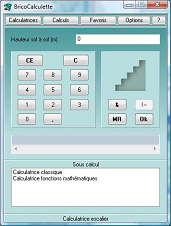


The calculation takes into account the following constraints: the step height must be between 16 and 19 cm and the tread should be at least 24 cm to ensure ride comfort. By default, the calculation determines the value of setbacks but you can set this value so that only the step height is calculated.
Calculator: stairs replaces manual calculation which rarely lead to good results the first time.
In the case of manual calculation the number of steps does not necessarily fall right the first time. It is then rounded to the nearest then verify that no wake recalculated is always between 57 and 64 cm value. If this is not the case we must recalculate.
With calculator: Staircase, you will immediately get a good result or a message indicating a problem with your input values .
Make your calculations made easy for stairs with BricoCalculette !

Here are some links that will allow you to obtain information on the use of BricoCalculette or calculation for stairecase:
Calculator: stairs of BricoCalculette User Guide
Demonstration videos of BricoCalculette
Section of FAQ BricoCalculette to calculate stairs

We talk about BricoCalculette on the web:
BricoCalculette on NetArtisanat
BricoCalculette on ConcreteDev

Other articles about BricoCalculette on WoodSoft:
BricoCalculette on ConcreteDev
BricoCalculette : Construction calculation
How to calculate wallpaper needed?

Tuesday, October 15, 2013

How to calculate wallpaper needed?

How to calculate wallpaper needed?
Looking for a way to calculate the amount of wallpaper you need for your room or your home.

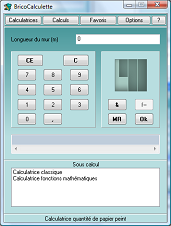
The Calculator: wallpaper of BricoCalculette allows you to calculate the number of rolls of wallpaper needed to cover one or more walls consecutively. This amount of wallpaper is calculated taking into account the length of the wall height, the length and the width of a roll.


The calculation of wallpaper is very simple and the result is obtained in a few moments.

Calculation software for habitat adopted by more than 500 users.

So feel free to download the trial version.
 
Here are some links that will provide information and of course the ability to download and buy BricoCalculette:
Faq BricoCalculette
BricoCalculette User Guide
Tutorial BricoCalculette to calculate wallpaper with BricoCalculette
Purchase BricoCalculette

We talk about BricoCalculette on the web:
BricoCalculette on P.R. shareware
BricoCalculette on ConcreteDev

Other articles about BricoCalculette on WoodSoft:
Carpentry Software
How to calculate stair steps?
BricoCalculette : Construction calculation

Saturday, October 12, 2013

Cutting list software for woodworking

Looking for a cutting list software for woodworking

OPCutting software is both simple and powerful that will allow you to optimize your cutting list of panels, saving time and money by reducing unusable scraps of panels.


Download the free trial version

What is OPCutting?
it allows you to easily create lists of cutting and optimize the placement of the parts in the panels so as to limit the number of panels used.

OPCutting is designed for the professional of woodworking to be able to use it after a period of learning a few minutes.

The cutting list software OPCutting has already been adopted by more than 2,000 professionals of woodworking and cutting.

Here are some links that will provide information, videos and of course the ability to download and buy OPCutting:
Faq OPCutting
Video demonstrations OPCutting
Tutorial for creating a cutting list of woodworking

Purchase OPCutting

We talk about OPCutting:
OPCutting on NetArtisanat
OPCutting on Youtube
OPCutting on P.R. shareware
OPCutting on ConcreteDev

Other articles about OPCutting on WoodSoft:
Tutorial of creation of a complex cutting plan with cutting plan software
Excel for OPCutting
Online guides for using software

If you are looking for a cutting list software  to save time and reduce your purchase panels, then OPCutting is for you.

Wednesday, November 21, 2012

Tutorial of creation of a complex cutting plan with cutting plan software


Hello,
I created a tutorial that shows you step by step, the creation of a complex cutting plan with cutting plan software OPCutting. You can use this tutorial to help you when making your first "complex" cutting plan (several materials and several thickness of panels). You can also watch a video made by the French version of OPCutting that shows the creation of a complex cutting plan.

Here is the link to tutorial


Here are some links that will allow you to obtain information on the use of OPCutting:
OPCutting's user guide
OPCutting's FAQ

We talk about OPCutting on the web:
OPCutting on ConcreteDev
OPCutting on Softpedia.com
OPCutting on Trguwhks

Other articles about OPCutting on WoodSoft:
OPCutting cutting list software for woodworking
New version of OPCutting
Demonstration video of OPCutting

Thursday, November 8, 2012

Demonstration video for OPCutting the cutting optimization software

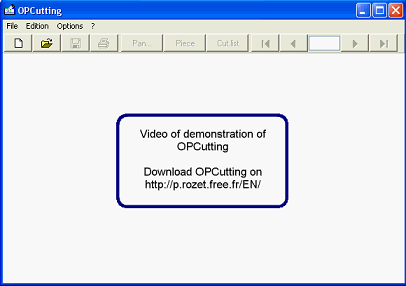
There is now a page to comment on the video "Creating a simple cutting plan" with the software OPCutting. This video and commentary help you to understand in a few minutes the main features of the cutting optimization software with a very simple example for cutting wood in order to quickly achieve your first cutting optimization. You can even train you, such as reuse of video.
Here is the link to the video
Here is the link to the video comment


Here are some links that will allow you to obtain information on the use of OPCutting:
OPCutting's user guide
OPCutting's FAQ

We talk about OPCutting on the web:
OPCutting on ConcreteDev
OPCutting on Softpedia.com
OPCutting on Trguwhks

Other articles about OPCutting on WoodSoft:
OPCutting cutting list software for woodworking
New version of OPCutting
Tutorial of creation of a complex cutting plan

Tuesday, February 14, 2012

Excel for OPCutting

Hello,
I work on an Excel application to create cutting lists that automatically generates files that can be imported into OPCutting beings:
This Excel application allows you to easily create and very flexible cutting lists and generate from these files to the format expected by OPCutting. These files enable OPCutting optimize the placement of items seized in the cutting lists, in the panels.
This application designed for use with OPCutting can also be used independently of it for the easy creation of cutting lists to suit your way of working that you can print and use in the workshop.
This application will not be free but as usual very cheap and is intended to facilitate the life and work of users OPCutting but also all those who regularly create and use cutting lists.

This application is developed with Excel 2003 and requires obviously to have Excel installed on their computer.

Other articles about Excel cutting list application on WoodSoft:
Excel cut list application


Soon, a new version of OPCutting

hello,
I would put in a few weeks online version 1.1 of OPCutting the cutting optimization software.
This version will bring several improvements such as:
- A list of designations of pieces which is used to select pieces designations rather than having to re-enter it each time.
- The display and printing of lines cut.
- The viewing, printing and export of the list cutting waste.
- Improved navigation in the input panels and pieces.
- The value of the margin and the thickness of the saw cut filled in by default and configurable options.
- The automated feeding and customizable lists of species, designations and dimensions when importing cutting lists. OPCutting automatically adds the values ??that are present in these lists from data contained in the cutting list if you wish.
- Automatic detection of cutting list for optimization of cuttings of bars when importing cutting list.